
CheckPvE addon for World of Warcraft
Copy a player's CheckPvE profile link without leaving the game — or build a Multi-Check share link from several applicants with a few button clicks, then compare them side by side on the site.
Funnel: try a lookup on the site → grab the addon → use it in LFG (single links or Multi-Check) → paste back on CheckPvE.
What the addon does
CheckPvE is a lightweight companion for checkpve.net. It builds the same profile and Multi-Check URLs the website uses so you can check applicants and friends in seconds.
- Right-click unit / chat / guild menus → Copy CheckPvE URL
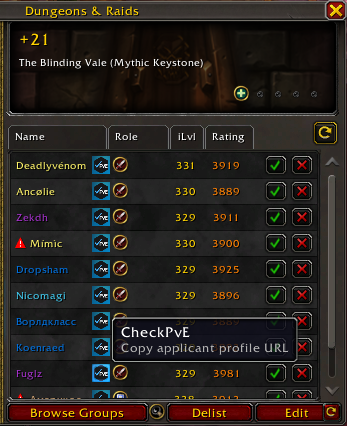
- Premade Group Finder listings and your applicant rows
- Friends list icon next to the Battle.net game icon
- Multi-Check mode: tick the checkbox in the copy dialog, then keep clicking CheckPvE buttons to grow one share link
Build a Multi-Check link in-game
When several applicants look promising, you do not need to paste each Name-Realm by hand. Enable Multi-Check once, then add characters with the same buttons you already use — the dialog turns into one share URL for the website.
- Open the CheckPvE copy dialog from an applicant icon, right-click menu, or friends list.
- Tick Multi-Check in the dialog (counter shows how many of up to 12 are collected).
- Click more CheckPvE buttons on other characters — the first stays a normal profile link; from the second onward you get one Multi-Check URL.
- Press Ctrl+C, then paste on Multi-Checkto load everyone side by side with a suggested pick for Mythic+ or raid.
In-game example
How to install
- Open the CurseForge page and install CheckPvE for Retail.
- Restart the WoW client or type /reload.
- Right-click a player or use the friends/LFG icon, copy the URL, and paste it at checkpve.net.
Why use it for LFG?
Premade leaders need a fast read on Mythic+ prestige and raid curve history — not only today's score. CheckPvE surfaces account-wide titles and AotC/CE at a glance, then links into Warcraft Logs for parses. With Multi-Check you can stack several applicants into one comparison before you invite.
More detail: WoW LFG character check · Multi-Check · FAQ.